
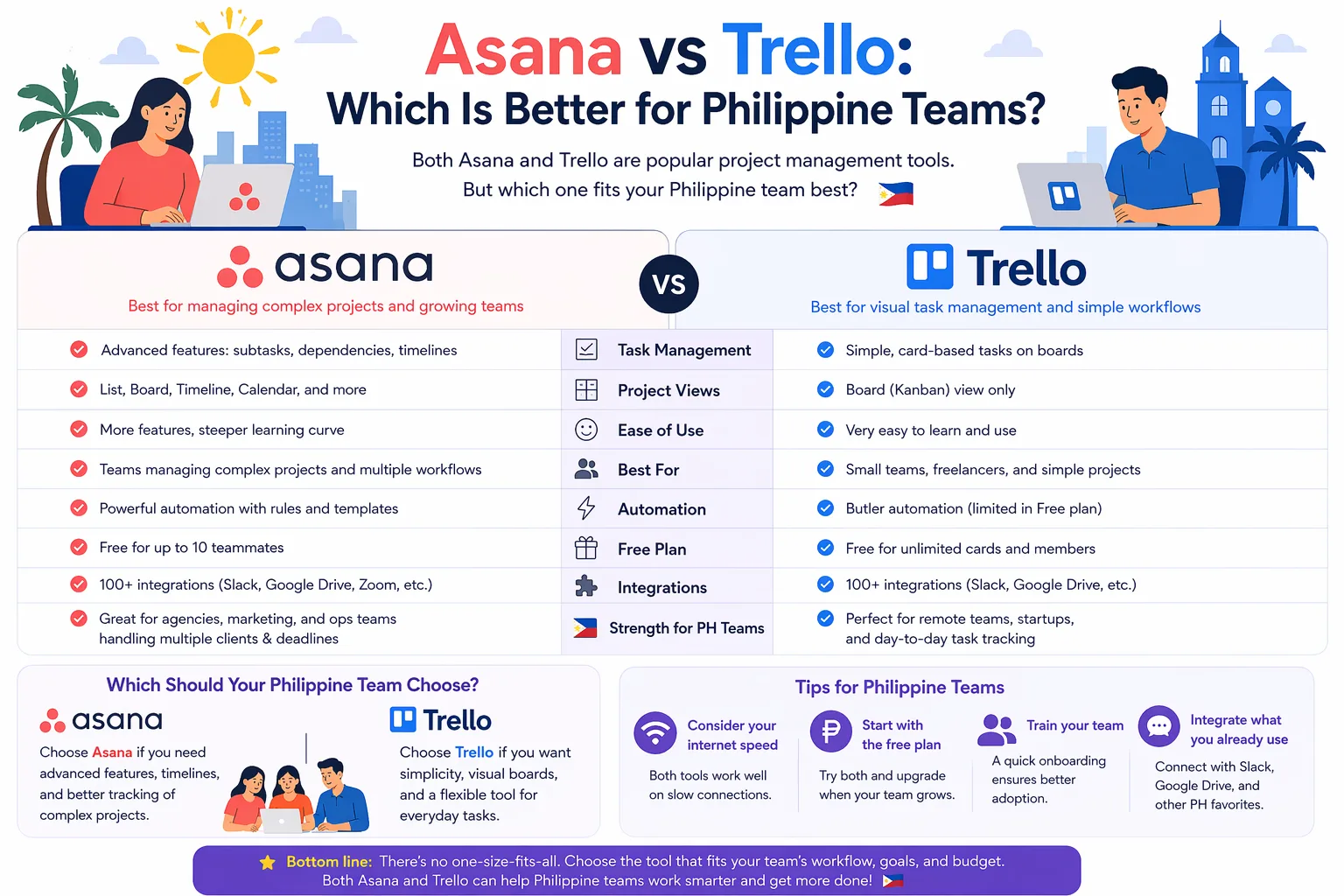
Asana vs Trello: Which Is Better for Philippine Teams?
Choosing between Asana vs Trello Philippines often comes down to how your team actually works. If you run a startup, agency, ecommerce store, or remote freelance team in the Philippines, the best tool is the one that matches your workflow, budget, and level of complexity.
Both tools are popular for task tracking and team collaboration, but they serve different needs. Trello is simple, visual, and easy to adopt. Asana is more structured, better for larger teams, and stronger for managing multiple projects with dependencies and approvals.
In this guide, we’ll compare pricing, features, strengths, and real-world use cases so you can decide which is worth paying for in Philippine pesos.
Quick comparison: Asana vs Trello
| Feature | Asana | Trello |
|---|---|---|
| Best for | Structured project management | Simple visual task tracking |
| Ease of use | Moderate | Very easy |
| Views | List, board, timeline, calendar, more | Board, list, calendar, timeline on paid plans |
| Automation | Strong | Good, but simpler |
| Team coordination | Better for cross-functional teams | Better for small teams or solo users |
| Reporting | Stronger reporting and progress tracking | Lighter reporting |
| Learning curve | Higher | Lower |
| Best use case | Agencies, ops teams, multi-step projects | Content teams, freelancers, small businesses |
Asana vs Trello Philippines: which one fits your team?
Choose Asana if you need:
- More control over project stages
- Task dependencies and approvals
- Better visibility across multiple projects
- Stronger reporting for managers
- A tool that can scale with growing teams
Choose Trello if you need:
- A simple Kanban-style workflow
- Fast onboarding for non-technical users
- A lightweight tool for daily task management
- A budget-friendly option for small teams
- A visual board that feels easy to maintain
For many Filipino teams, the decision is not about which tool is better overall. It is about which one is better for your current process.
Pricing in the Philippines: what to expect
Pricing can change over time, so always check the official sites before subscribing. Still, for budgeting purposes, it helps to think in terms of monthly software spending in PHP.
Asana pricing considerations
Asana usually becomes more attractive when your team needs advanced project features. Paid plans can be worth it if:
- you manage multiple campaigns
- you need timeline planning
- you require workload or reporting tools
- your team needs permission controls
For Philippine businesses, Asana may feel more expensive than Trello, but the cost can make sense if it replaces manual coordination in chat apps and spreadsheets.
Trello pricing considerations
Trello is often easier to justify for smaller teams because:
- the free version is useful for basic boards
- the interface is easy to adopt quickly
- paid plans usually stay aligned with simple task management needs
If your team only needs boards, cards, due dates, and light automation, Trello can be a practical low-cost choice.
Feature-by-feature comparison
1. Ease of use
Trello wins for simplicity. Most users understand boards and cards immediately. This makes it a good fit for Philippine teams that want fast setup without training.
Asana is still user-friendly, but it asks more from the team. The payoff is better structure, especially for teams handling recurring work, content pipelines, or multi-step approvals.
2. Project structure
Asana is stronger when your work is not just a simple to-do list. You can organize work by project, assign owners, set dependencies, and track deadlines more clearly.
Trello works best when your process can be represented visually as columns moving from left to right. That is ideal for basic workflows like:
- to do
- in progress
- review
- done
3. Collaboration
Both tools support collaboration, but Asana is better for teams with several stakeholders. It reduces confusion when multiple people are working on the same deliverable.
Trello is excellent for lean teams that prefer a lighter collaboration style.
4. Automation
Asana generally offers more advanced automation and workflow control. This can save time for operations, marketing, and client service teams.
Trello also has automation, but it is usually enough for simpler repetitive actions rather than more complex processes.
5. Reporting and visibility
If your manager or client wants a clearer overview of status, blockers, and progress, Asana is the stronger platform.
Trello is more about task flow than reporting depth.
Best use cases for Filipino teams
Asana is better for:
- agencies managing client projects
- BPO support teams tracking processes
- internal operations teams
- marketing teams with deadlines and dependencies
- businesses that need accountability and reporting
Trello is better for:
- freelancers managing personal work
- small ecommerce teams handling daily tasks
- content creators and editorial teams
- startups with simple workflows
- virtual assistants and solopreneurs
Which tool is better for specific Philippine business scenarios?
For agencies
Asana is usually the better choice because client work often involves timelines, approvals, and multiple people.
For ecommerce businesses
If your store needs simple task tracking, Trello may be enough. If you run promotions, inventory coordination, and team-based operations, Asana may be better.
For freelancers
Trello is often the easiest starting point, especially if you want a visual dashboard for clients and deadlines.
For remote teams
Asana is usually stronger when your team works asynchronously and needs clearer ownership.
For budget-conscious small businesses
Start with Trello if you want lower complexity. Upgrade only if your workflow becomes too messy.
Pros and cons
Asana pros
- Strong project management features
- Better for growing teams
- Good for complex workflows
- More reporting and visibility
Asana cons
- Can feel heavy for simple tasks
- Higher learning curve
- May be more than some small teams need
Trello pros
- Very easy to use
- Great for visual workflows
- Fast setup
- Good for small teams and freelancers
Trello cons
- Less powerful for complex projects
- Reporting is lighter
- Can become cluttered if processes grow too much
Final verdict: Asana vs Trello Philippines
If your team wants simplicity and speed, choose Trello.
If your team needs structure, accountability, and better project visibility, choose Asana.
For many Philippine teams, the practical answer is this:
- Trello for small, straightforward workflows
- Asana for growing, multi-person operations
The best way to decide is to compare the features against your real workflow, not just the brand name. If you want to explore more software alternatives and pricing breakdowns, check RPAMZ for tool comparisons that help Filipino teams choose smarter.
FAQ
Is Asana better than Trello for Philippine teams?
It depends on the workflow. Asana is better for complex projects and team coordination, while Trello is better for simple visual task management.
Which is cheaper in the Philippines, Asana or Trello?
Trello is often easier to start with on a budget, especially for small teams. Asana may cost more but can offer better value for teams that need advanced project features.
Can freelancers use Asana or Trello?
Yes. Freelancers often prefer Trello for simplicity, but Asana is useful if they manage multiple clients, deadlines, and recurring tasks.
Which tool is easier for non-technical users?
Trello is usually easier for beginners and non-technical users.
Is Asana worth paying for?
Asana is worth paying for if your team needs stronger planning, reporting, and workflow control.
Can I switch from Trello to Asana later?
Yes. Many teams start with Trello and move to Asana when their process becomes more complex.
Compare more tools on RPAMZ
If you are still deciding, use RPAMZ to compare more software options, find alternatives, and check which tools fit your budget and workflow best.