# Best Tools for Small Business in the Philippines: Software for Sales, Marketing, and Operations
Running a small business in the Philippines means balancing growth, budget, and day-to-day operations. The right software can save time, improve customer response, and help you sell more without hiring too early.
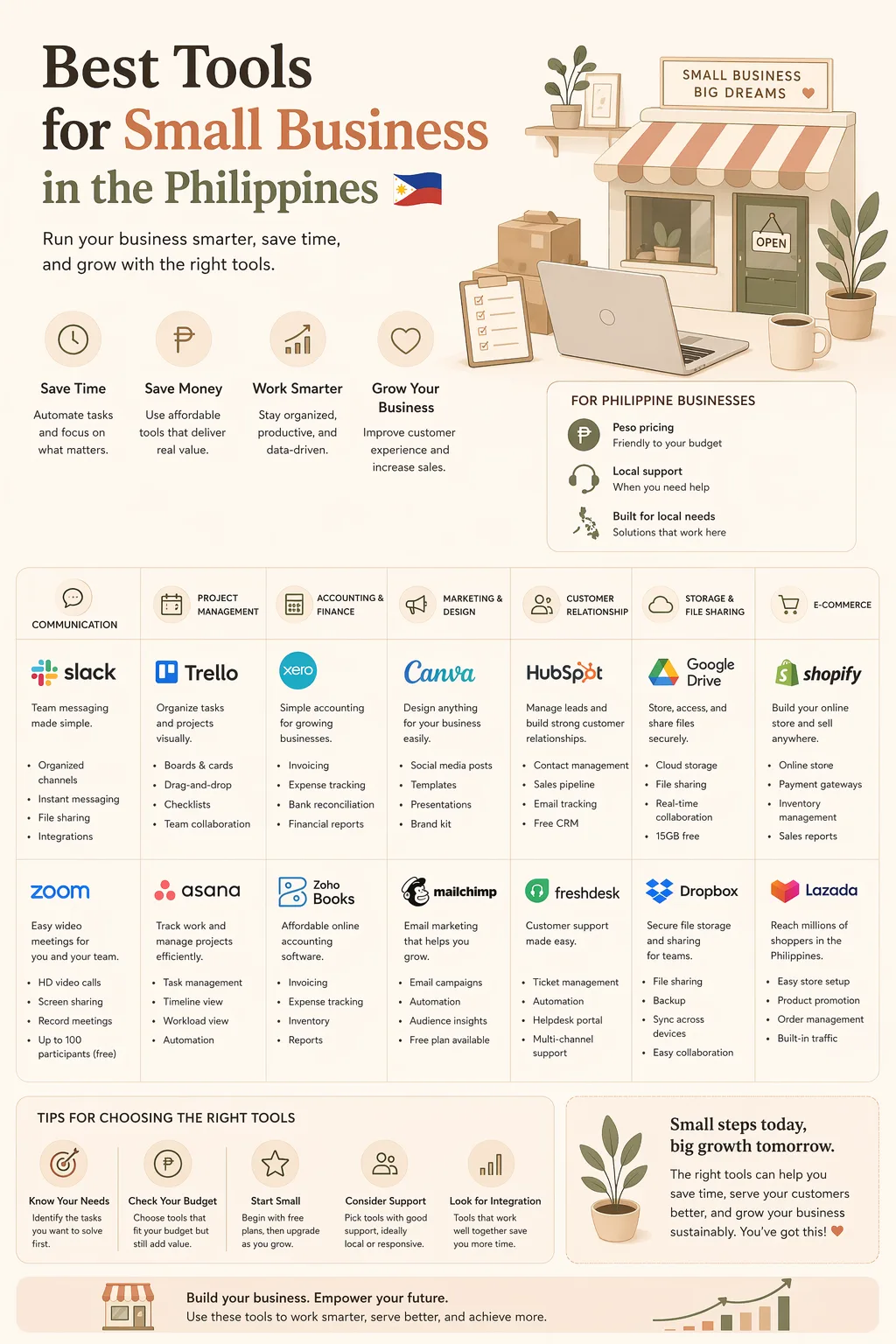
If you are searching for the best tools for small business Philippines, this roundup will help you compare practical options for sales, marketing, accounting, communication, and operations. We will focus on tools that make sense for Filipino founders, side hustlers, and SME teams.
What Filipino small businesses should look for in a tool
Before buying software, check if it fits your workflow and budget.
Key things to compare:
- Price in PHP or USD and how the billing works
- Monthly vs annual plans
- Free trial or free plan
- Local payment options such as credit card, debit card, or PayPal
- Ease of use for non-technical teams
- Mobile access for on-the-go work
- Customer support hours that work for your timezone
- Integrations with your existing tools
For many Filipino businesses, the best choice is not the most advanced platform. It is the tool your team will actually use every day.
Best tools for sales and lead management
Sales tools help you track leads, follow up faster, and avoid losing potential customers in chat threads or spreadsheets.
1. HubSpot CRM
A strong starting point for businesses that want a free CRM with room to grow.
Best for:
- Lead tracking
- Sales pipeline management
- Basic automation
- Small teams starting with CRM
Why it works:
- Easy to use
- Free plan available
- Good for organizing inbound leads
Considerations:
- Advanced features can get expensive as you scale
- Some teams may only need the basics, so compare carefully before upgrading
2. Zoho CRM
A flexible option for businesses that want more control over sales processes.
Best for:
- Businesses with repeat sales follow-up
- Teams needing customization
- Owners who want a broader business suite
Why it works:
- Strong automation features
- Works well if you want to connect sales with other business functions
- Often a practical choice for budget-conscious teams
Considerations:
- Can take time to set up properly
- Best when someone on the team can manage the configuration
Best tools for marketing and customer acquisition
Marketing tools help you reach more customers through email, social media, landing pages, and chat.
3. Mailchimp
A popular email marketing tool for small businesses that want to send campaigns and automate simple follow-ups.
Best for:
- Newsletter campaigns
- Promo announcements
- Customer re-engagement
Why it works:
- Beginner-friendly
- Useful free tier for testing
- Good for businesses that rely on email promotions
Considerations:
- Pricing can rise as your contact list grows
- Compare it with simpler tools if you only need basic campaigns
4. Meta Business Suite
A practical free tool for businesses that market through Facebook and Instagram.
Best for:
- Social media posting
- Inbox management
- Ad campaign coordination
Why it works:
- Free to use
- Helpful for businesses that get most customers from social platforms
- Centralizes posting and messaging
Considerations:
- Best when paired with a proper content and response workflow
- Not a full marketing platform for every channel
5. Canva
A must-have for businesses creating their own social media graphics, flyers, menus, and promo materials.
Best for:
- Social media creatives
- Posters and promos
- Simple brand design work
Why it works:
- Easy for non-designers
- Huge time saver for small teams
- Useful for online and offline marketing
Considerations:
- Some premium assets require paid plans
- Free version may already be enough for basic needs
Best tools for accounting and operations
Good operations tools help you stay organized, reduce errors, and keep your finances clear.
6. QuickBooks Online
A well-known accounting tool for businesses that need invoicing, expense tracking, and financial reports.
Best for:
- Invoicing
- Expense tracking
- Bookkeeping support
- Businesses preparing for growth
Why it works:
- Strong accounting features
- Helps keep records organized
- Useful if you work with an accountant or bookkeeper
Considerations:
- May be more than what a very small business needs at first
- Compare plan costs carefully
7. Xero
Another accounting platform that fits small businesses looking for clean reporting and collaboration.
Best for:
- Small businesses with bookkeeping needs
- Businesses that want cloud accounting
- Teams that work with external accountants
Why it works:
- Modern interface
- Good for financial organization
- Popular with service-based businesses
Considerations:
- Make sure the plan fits your invoice volume and users
- Check which payment methods are available to you
8. Trello
A simple project management tool for organizing tasks, orders, and team workflows.
Best for:
- Task tracking
- Content planning
- Order fulfillment steps
- Small teams that want visual boards
Why it works:
- Very easy to adopt
- Helps keep operations visible
- Great for businesses managing multiple small tasks at once
Considerations:
- Not a full operations system
- Works best for simple workflows
Best tools for communication and customer support
Fast communication matters in the Philippines, especially for businesses that sell through Messenger, email, and mobile chat.
9. Slack
Best for internal team communication when your business is growing beyond chat apps.
Best for:
- Internal communication
- Team coordination
- File sharing and updates
Why it works:
- Keeps work messages organized
- Useful when you have multiple team members
Considerations:
- Not always necessary for very small teams
- Compare it with cheaper or simpler communication setups
10. Google Workspace
A reliable bundle for business email, shared documents, and collaboration.
Best for:
- Professional email
- Shared documents and spreadsheets
- Business files and calendars
Why it works:
- Familiar and easy to adopt
- Good for remote or hybrid teams
- Useful for day-to-day admin work
Considerations:
- Ongoing subscription cost
- Worth it if your business relies on collaboration and a professional email setup
How to choose the right tools for your business stage
Not every business needs every tool. A lean setup is often better than a crowded stack.
If you are just starting
Focus on:
- Canva for marketing creatives
- Meta Business Suite for social media
- Google Workspace for email and docs
- Trello for task management
If you are getting regular leads and orders
Add:
- HubSpot CRM or Zoho CRM for sales tracking
- Mailchimp for email campaigns
- Accounting software for cleaner records
If your business is growing
Consider:
- A more advanced CRM
- Better reporting and bookkeeping tools
- Internal communication platforms like Slack
- Workflow automation between systems
Pricing and local payment considerations for Filipino buyers
When comparing tools, do not just look at feature lists. Check the actual payment experience too.
For Filipino users, useful questions include:
- Can you pay with a local debit or credit card?
- Is billing monthly or annual?
- Does the tool charge in USD, and will that affect your budget?
- Are there hidden fees for extra users or contacts?
- Is the free plan enough before you upgrade?
If you are paying in foreign currency, remember that exchange rates can affect your monthly cost. That is why comparing plans carefully matters before you commit.
Recommended starter stack by use case
Here are simple combinations to help you decide faster:
- Online seller: Canva + Meta Business Suite + Google Workspace
- Service business: HubSpot CRM + Google Workspace + Trello
- Growing SME: Zoho CRM + Mailchimp + QuickBooks Online
- Content-driven business: Canva + Mailchimp + Trello + Slack
FAQ
What are the best tools for small business in the Philippines?
The best tools for small business in the Philippines are the ones that fit your budget, workflow, and team size. In most cases, that means starting with practical tools like Google Workspace, Canva, Meta Business Suite, Trello, and a CRM such as HubSpot or Zoho.
How do I choose the best tools for small business in the Philippines?
Compare the price in PHP or USD, monthly vs annual billing, free trials, local payment options, ease of use, mobile access, support hours, and integrations. The best tools are the ones your team will actually use every day.
What kind of tools should a small business in the Philippines start with?
A good starter stack usually includes Canva for marketing, Meta Business Suite for social media, Google Workspace for email and documents, and Trello for task management. If you are getting more leads or orders, add a CRM and accounting software.
Final thoughts
The best tools for small business Philippines depend on your sales process, budget, and how your team works. Start with the essentials, compare pricing and payment options, and only pay for features you will actually use.
If you want a faster way to compare software, affiliate offers, and online business tools, RPAMZ can help you discover and evaluate options in one place. Use it as your comparison and discovery platform before you buy.