
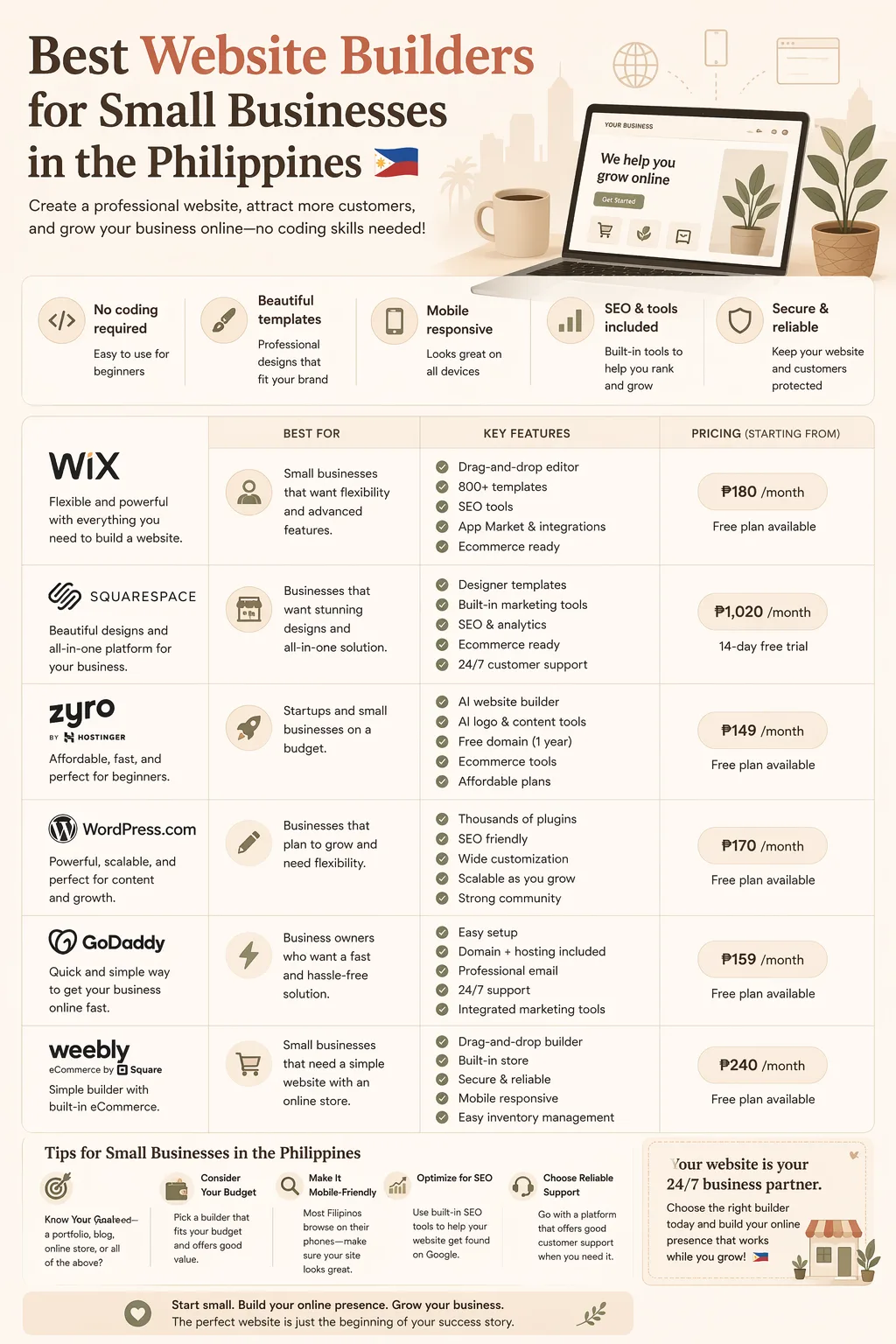
Best Website Builders for Small Businesses in the Philippines
If you run a small business in the Philippines, the right website builder can help you look professional online without hiring a developer. Whether you sell services, products, or both, the best choice depends on your budget, skill level, and what you need your site to do.
For anyone comparing the best website builders for small businesses in the Philippines, focus on platforms that are affordable, easy to use, mobile-friendly, and built to grow with your business.
What to look for in a website builder
Before choosing a platform, check these essentials:
- Affordable pricing that fits a small business budget
- Easy setup with templates or drag-and-drop editing
- Mobile-responsive design for customers using phones
- Custom domain support for a more trusted brand
- Ecommerce or booking features if you sell online or take appointments
- Useful local contact options such as Messenger, inquiry forms, bank transfer details, or GCash-friendly workflows
- Basic SEO tools so your business can show up on Google
For many Filipino entrepreneurs, the best builder is not the most advanced one. It is the one you can launch quickly and maintain without stress.
Best website builders for small businesses in the Philippines
Here are the most common options worth comparing for Philippine small businesses.
1. Wix
Wix is beginner-friendly and known for drag-and-drop editing plus a large template library.
Best for:
- Freelancers
- Service businesses
- Portfolios
- Simple company websites
Why consider it:
- Easy to set up
- Flexible design options
- Good variety of templates
Watch out for:
- Costs may increase as you add features
- The editor can feel busy for first-time users
2. Shopify
Shopify is a strong choice if your main goal is selling products online.
Best for:
- Ecommerce stores
- Resellers
- Product-based businesses
Why consider it:
- Strong store management tools
- Reliable checkout and inventory features
- Scales well as sales grow
Watch out for:
- Not ideal for non-store websites
- Apps and monthly fees can increase total cost
3. WordPress with hosting and a page builder
WordPress gives you more control and flexibility, especially when paired with a simple page builder.
Best for:
- Businesses that want long-term flexibility
- Content-heavy websites
- Owners willing to learn a bit more
Why consider it:
- Strong SEO potential
- Huge plugin ecosystem
- Easy to expand later
Watch out for:
- More setup than all-in-one builders
- Hosting, themes, and plugins may need maintenance
4. Squarespace
Squarespace is known for clean templates and polished design.
Best for:
- Creative freelancers
- Consultants
- Brands that want a premium look
Why consider it:
- High-quality design
- Simple site management
- Good for service pages and portfolios
Watch out for:
- Less flexible than WordPress
- May not be the cheapest option
5. Hostinger Website Builder
Hostinger Website Builder is a budget-friendly option for users who want a fast, simple launch.
Best for:
- New businesses
- Local services
- Budget-first websites
Why consider it:
- Beginner-friendly
- Often bundled with hosting
- Quick to launch
Watch out for:
- Fewer advanced features
- Best for straightforward websites
Which website builder fits your business?
The best platform depends on what you need the website to do.
For freelancers
Look for a builder that makes it easy to show:
- Services
- Portfolio samples
- Contact details
- Testimonials
- An inquiry form or booking link
A simple one-page website is often enough to start.
For local shops and service businesses
If you run a salon, clinic, repair shop, home service, restaurant, or similar business, prioritize:
- Mobile-friendly design
- Clear address and contact info
- Map integration
- Business hours
- Booking or inquiry features
For online sellers
If you plan to sell products, make sure the builder supports:
- Product listings
- Cart and checkout
- Shipping settings
- Inventory tracking
- Payment methods your customers can actually use
Budget considerations for Philippine businesses
Do not compare website builders based only on the advertised price. Consider the full cost of running the site.
Account for:
- Monthly or annual subscription fees
- Domain name cost
- Payment processing fees
- Paid apps or add-ons
- Time spent managing the site
For many small businesses, the smartest approach is to start lean. Launch a simple site first, then upgrade once you see more inquiries, leads, or sales.
Quick shortlist
If you want a fast comparison, use this guide:
- Easiest setup: Wix or Hostinger Website Builder
- Best for online stores: Shopify
- Best for long-term flexibility: WordPress
- Best for premium design: Squarespace
A good next step is to shortlist a few tools, test the editors, and check whether the features match your workflow.
Final recommendation
The best website builders for small businesses in the Philippines are the ones that help you publish quickly, stay within budget, and present your business professionally.
If you want affordable website tools for your business, compare your options before signing up. RPAMZ helps you discover and compare tools in one place so you can choose with confidence.
Ready to compare more website builders and business tools? Use RPAMZ to find the right fit for your website, offer, and growth goals.