
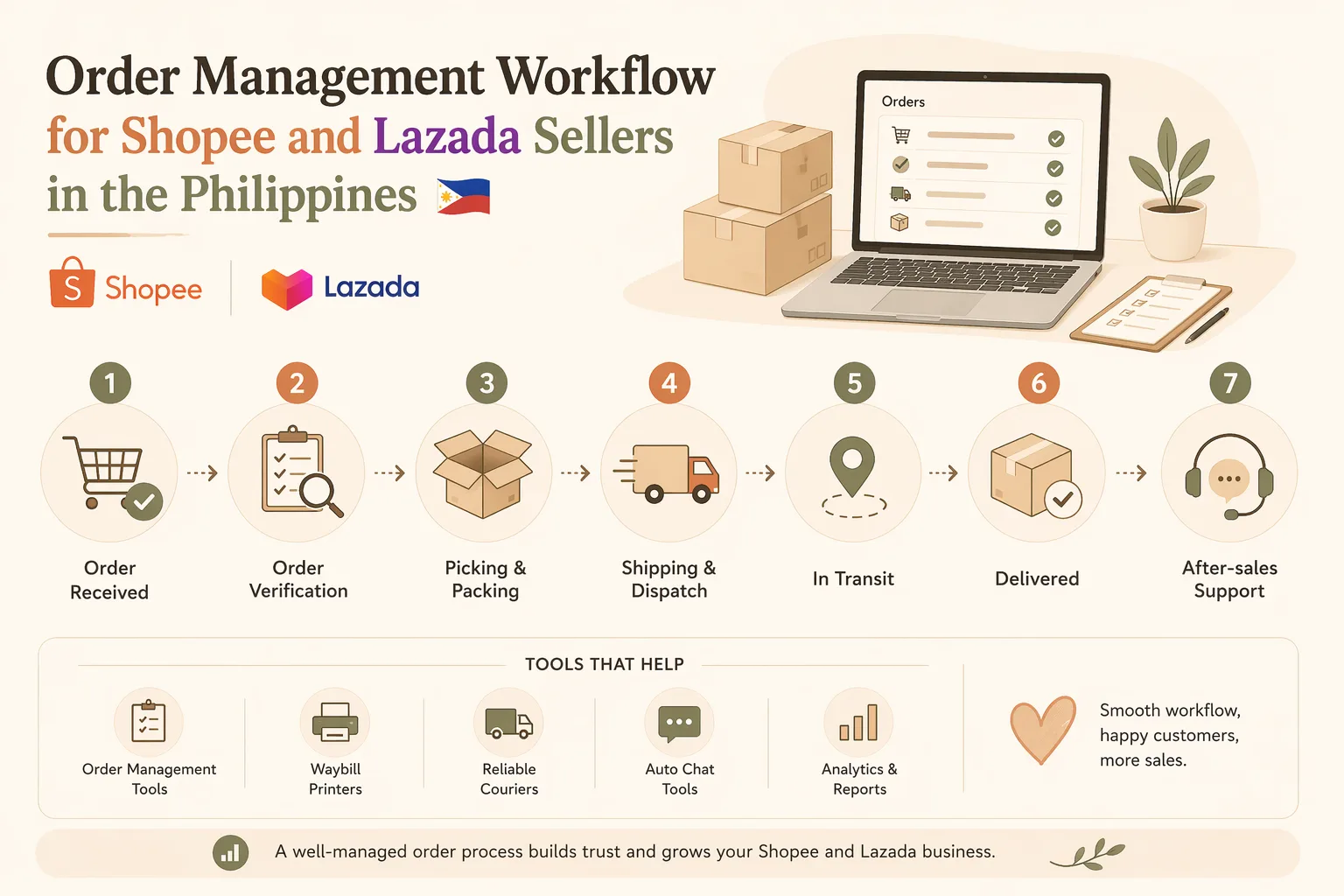
Order Management Workflow for Shopee and Lazada Sellers in the Philippines
If you sell on Shopee and Lazada, your order management workflow can make or break your daily operations. A good process helps you avoid missed orders, late shipment, wrong items, and unnecessary customer complaints. A weak process usually leads to stress, manual errors, and poor ratings.
This guide walks you through a practical order management workflow for Shopee and Lazada sellers in the Philippines. It is designed for small sellers, growing shops, and ecommerce teams that want a clearer system for handling orders from checkout to delivery.
What order management means for marketplace sellers
Order management is the process of receiving, reviewing, picking, packing, shipping, updating, and supporting each order after a customer places it.
For Shopee and Lazada sellers, this usually includes:
- Monitoring incoming orders
- Checking stock before confirming fulfillment
- Preparing items for packing
- Printing labels and waybills
- Handing orders to the courier or arranging pickup
- Updating customers when needed
- Handling cancellations, returns, and disputes# Order Management Workflow for Shopee and Lazada Sellers in the Philippines
If you sell on Shopee and Lazada, a clear order management workflow helps you avoid missed orders, late shipments, packing errors, and customer complaints. This guide gives Filipino sellers a simple process from order intake to delivery.
What order management means
Order management covers receiving, checking, picking, packing, shipping, and supporting orders after checkout.
For Shopee and Lazada sellers, this usually includes:
- Monitoring incoming orders
- Checking stock before fulfillment
- Preparing items for packing
- Printing labels and waybills
- Arranging courier pickup or drop-off
- Handling cancellations, returns, and disputes
Why a clear workflow matters
A structured workflow helps you:
- Reduce shipping and packing errors
- Improve stock accuracy
- Speed up fulfillment
- Support better customer service
- Handle peak sales more smoothly
- Train staff more easily
Recommended workflow
1. Receive and review orders
Check new orders at set times, such as morning, midday, and late afternoon. Review buyer details, SKU, quantity, payment status, shipping option, and special notes.
2. Validate stock
Confirm the item is actually available in your own inventory, not just in the marketplace listing. Check on-hand stock, reserved stock, and variant inventory.
3. Prioritize orders
Pack orders based on ship-by deadline, shipping speed, payment status, and special instructions.
4. Pick items
Use a picking list with order number, SKU, product name, variant, quantity, and storage location.
5. Pack orders consistently
Check the item, add inserts or freebies if needed, seal properly, and use the correct mailer or box.
6. Print labels and waybills
Verify the recipient name, address, courier, and tracking number before attaching the label.
7. Update tracking and status
Mark the order as shipped or ready for pickup, then save tracking details in your records.
8. Monitor delivery issues
Watch for failed deliveries, refunds, missing parcels, wrong items, and return cases.
Simple workflow comparison
| Workflow style | Best for | Pros | Cons |
|---|---|---|---|
| Manual spreadsheet workflow | Very small sellers | Low cost, easy to start | Time-consuming, more errors |
| Marketplace dashboard only | Beginners on one platform | Simple and familiar | Harder for Shopee and Lazada together |
| Centralized order management tool | Multi-platform sellers | Faster processing, better visibility | May require subscription and setup |
Tools to support your workflow
Useful tools include:
- Order management software
- Inventory trackers
- Shipping and fulfillment tools
- Customer support tools
- Spreadsheet templates
When comparing tools, look for multi-platform sync, inventory updates, batch printing, status tracking, permissions, and reporting. For Filipino sellers, pricing in PHP and ease of setup also matter.
Best practices
- Set fixed processing times
- Use one SKU naming system
- Keep fast movers easy to reach
- Document exceptions
- Train staff with the same checklist
Starter workflow for small shops
- Check new orders at fixed times
- Confirm stock manually or in a spreadsheet
- Pick items using a checklist
- Pack and verify each item
- Print and attach labels
- Mark orders as shipped
- Handle customer issues in one inbox or schedule
When to upgrade
Consider a better workflow if you miss orders, see inventory mismatches, make frequent packing mistakes, sell on multiple channels, or spend too much time copying order details manually.
Final thoughts
A reliable order management workflow for Shopee and Lazada sellers in the Philippines helps improve fulfillment, reduce errors, and keep customers happy. Start with a repeatable process, then upgrade to software when your volume grows.
FAQ
What is the best order management workflow for Shopee and Lazada sellers?
A repeatable process: receive orders, confirm stock, pick, pack, print labels, ship on time, and monitor after-sales issues.
Can small sellers use a manual workflow?
Yes. Spreadsheets and checklists can work well for small shops.
How do I avoid overselling?
Update inventory regularly and review stock before confirming each order.
Do I need software?
Not always. But it can save time and reduce errors if you sell on multiple channels or handle many orders daily.
What should I track?
Order number, SKU, quantity, payment status, shipping status, tracking number, and customer issue notes.
Order Management Workflow for Shopee and Lazada Sellers in the Philippines
A strong workflow keeps these steps consistent, even when order volume increases.
Why a clear workflow matters
A structured workflow helps you:
- Reduce packing and shipping errors
- Keep stock records more accurate
- Shorten fulfillment time
- Improve customer communication
- Prevent missed orders during peak sales days
- Make it easier to train staff
If you sell across both platforms, a workflow also helps you avoid checking each marketplace manually all day.
Recommended order management workflow
Here is a simple workflow that works well for many Filipino ecommerce sellers.
1. Receive and review orders
Start by checking new orders from Shopee and Lazada at set intervals, such as every morning, midday, and late afternoon.
At this stage, review:
- Buyer details
- Item SKU or variation
- Quantity
- Payment status
- Shipping option
- Special notes
If your store has many daily orders, use one dashboard or tool that collects orders in one place.
2. Validate stock before processing
Do not rely only on what the marketplace shows. Confirm that the item is actually available in your own inventory.
Check:
- On-hand stock
- Reserved stock for other orders
- Bundle items or add-ons
- Variant-specific inventory such as size or color
This step helps prevent cancellations caused by overselling.
3. Prioritize orders by cutoff and shipping speed
Not all orders should be packed in the same sequence.
Prioritize based on:
- Ship-by deadline
- Same-day or next-day shipment requirements
- Location if it affects courier pickup timing
- Orders with payment already confirmed
- Special customer instructions
A simple “first due, first out” rule works well for many sellers.
4. Pick items using a checklist
Use a printed or digital picking list to avoid mistakes.
Your picking list should include:
- Order number
- SKU
- Product name
- Variant
- Quantity
- Storage location
If you keep items in bins, shelves, or cartons, label them clearly so picking takes less time.
5. Pack orders consistently
Packing should follow the same standard for every order.
A basic packing process may include:
- Checking the item against the order list
- Adding freebies, inserts, or thank-you cards
- Sealing the product properly
- Using the right mailer, box, or pouch
- Adding fragile or direction labels if needed
- Double-checking weight and dimensions if required
A repeatable packing standard reduces complaints and returns.
6. Print labels and waybills
Once the order is packed, print the shipping label or waybill.
Make sure you verify:
- Correct recipient name
- Correct address
- Correct phone number if shown
- Correct courier service
- Correct tracking number
If you process many orders, batch printing can save time.
7. Update tracking and marketplace status
After handing off the parcel or arranging pickup, update the order status in the marketplace.
This may include:
- Marking the order as ready to ship
- Confirming shipment pickup
- Saving tracking details in your own records
- Noting any exceptions or delays
Keeping your records updated helps customer service and repeat order support.
8. Monitor delivery and customer issues
Order management does not end at shipment.
You should also watch for:
- Delivery failures
- Refund requests
- Missing parcel reports
- Wrong item complaints
- Return or replacement cases
Create a simple response process so your team knows who handles each issue.
Simple workflow comparison
| Workflow style | Best for | Pros | Cons |
|---|---|---|---|
| Manual spreadsheet workflow | Very small sellers | Low cost, easy to start | Time-consuming, more prone to errors |
| Marketplace dashboard only | Beginners selling on one platform | Simple and familiar | Harder to manage Shopee and Lazada together |
| Centralized order management tool | Multi-platform sellers | Faster processing, better visibility | May require subscription and setup |
Tools that can support your workflow
The right tools depend on your order volume and team size. Common categories include:
- Order management software
- Inventory trackers
- Shipping and fulfillment tools
- Customer support tools
- Spreadsheet templates for small operations
If you are comparing tools, look for features such as:
- Multi-platform order sync
- Inventory updates across channels
- Batch printing
- Status tracking
- User permissions for staff
- Reporting and export options
For Filipino sellers, it is also useful to compare pricing in PHP, ease of setup, and whether the tool supports your current workflow instead of forcing you to rebuild everything.
Best practices for Philippine sellers
Here are practical habits that improve day-to-day operations:
Set fixed processing times
Instead of checking orders randomly all day, set times for review, picking, and packing.
Use one naming system for SKUs
A clear SKU format makes variants easier to manage.
Separate fast movers from slow movers
Keep best-selling items in easy-to-reach locations.
Document exceptions
Write down canceled orders, courier issues, and stock discrepancies.
Train staff on the same checklist
Every packer should follow the same steps to reduce errors.
A practical starter workflow for small shops
If you are just getting organized, start with this version:
- Check new Shopee and Lazada orders at fixed times
- Confirm stock manually or in a spreadsheet
- Pick items using a checklist
- Pack and verify each item
- Print and attach labels
- Mark orders as shipped
- Respond to customer issues in one inbox or schedule
This simple setup is enough for many small sellers before moving to a more advanced system.
When to upgrade your process
You may need a better workflow if:
- You miss orders during busy periods
- Inventory does not match actual stock
- Packing mistakes happen often
- Staff members use different versions of the same list
- You sell on multiple channels
- You spend too much time copying order details manually
At that point, it makes sense to compare software options and find alternatives that match your business.
Final thoughts
A reliable order management workflow for Shopee and Lazada sellers in the Philippines is one of the best ways to improve fulfillment, reduce errors, and keep customers happy. You do not need a complicated system to start. You just need a repeatable process that covers order intake, stock checking, picking, packing, shipping, and support.
If you want to compare tools that can improve this workflow, explore RPAMZ for practical software comparisons and alternatives tailored for Filipino sellers.
FAQ
What is the best order management workflow for Shopee and Lazada sellers?
The best workflow is the one you can repeat consistently: receive orders, confirm stock, pick items, pack carefully, print labels, ship on time, and monitor after-sales issues.
Can small sellers use a manual workflow?
Yes. A manual workflow using spreadsheets and checklists can work well for small shops with low order volume, especially before investing in software.
How do I avoid overselling on Shopee and Lazada?
Keep your inventory updated regularly, use reserved stock logic if possible, and review stock before confirming each order.
Do I need software for order management?
Not always. But if you sell on multiple channels or process many orders per day, software can save time and reduce mistakes.
What should I track in an order management system?
At minimum, track order number, SKU, quantity, payment status, shipping status, tracking number, and customer issue notes.